START WITH THE COUNTRY PRICE GAP

Today's lowest reference: Philippines · $105.55 — about $94.45 less than the US.

We convert the local storefront price with the latest published exchange rate, then show what you may actually pay. See the price first; card offers come later.

Official regional storefront prices Exchange-rate conversion shown clearly Price data checked Aug 15, 2026, 10:54 AM
LOW-PRICE SNAPSHOTCurrent #1: Philippines · ₱6,490 → $105.5511 regional prices ranked automaticallyUS benchmark: $200.00
CURRENT WORKING ROUTE · OFFICIAL WEB PAGE

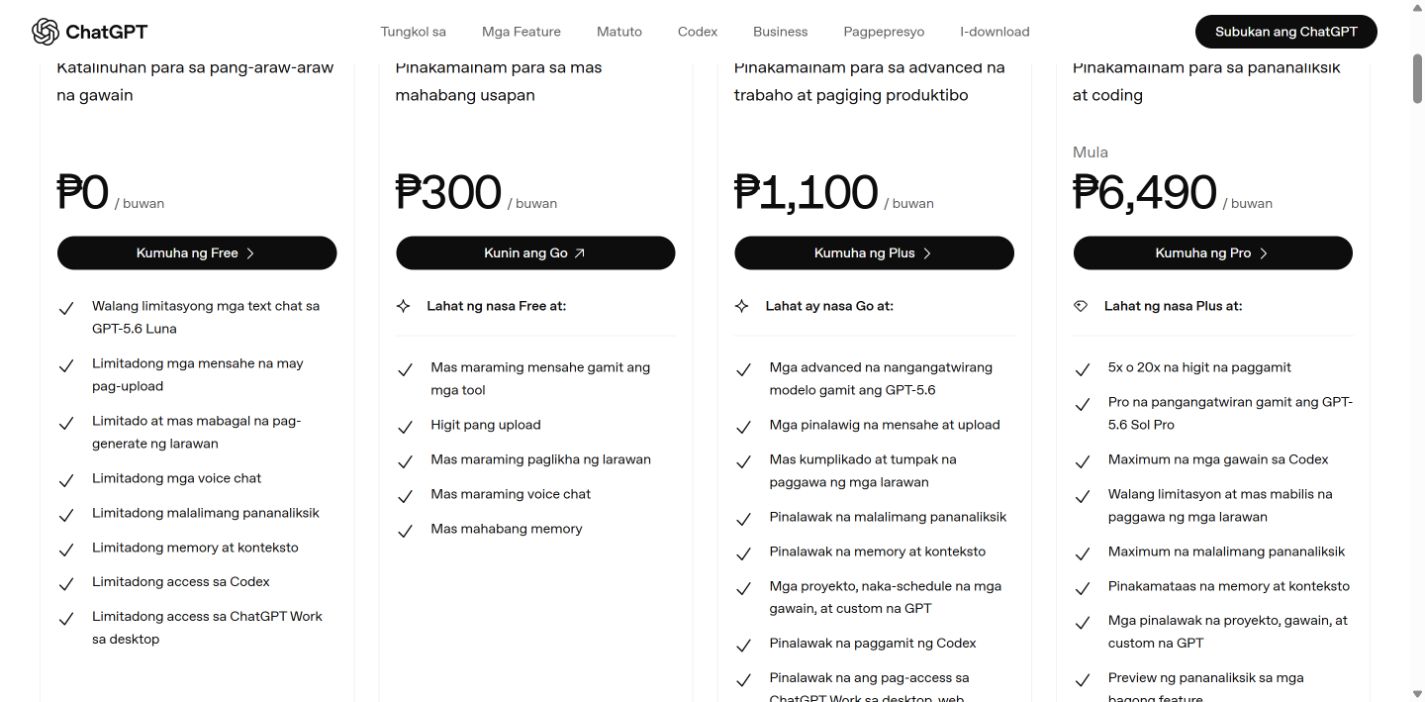
How to find ChatGPT Pro at ₱6,490 in Philippines.

At the checked exchange rate, that is about $105.55 instead of the $200.00 US reference — roughly $94.45 less before tax and card fees.

Official page checkedAug 15, 2026, 08:03 PM
Localized web price₱6,490
÷ 61.488
Converted today$105.55
Difference vs US$94.45
Tax, FX spread, and card fees are calculated separately at checkout.
01

Open ChatGPT pricing

Use the official pricing page in a desktop or mobile browser and scroll to the bottom-right corner.

02

Open the language selector

Tap the current language/country, search “Filipino,” and select it.

03

Confirm the Pro price

The official localized page should show ₱6,490 for Pro. If checkout shows another currency or amount, stop and recalculate.

04

Pay with real billing details

Use a payment method and billing information you are genuinely entitled to use. Confirm tax and total before submitting.
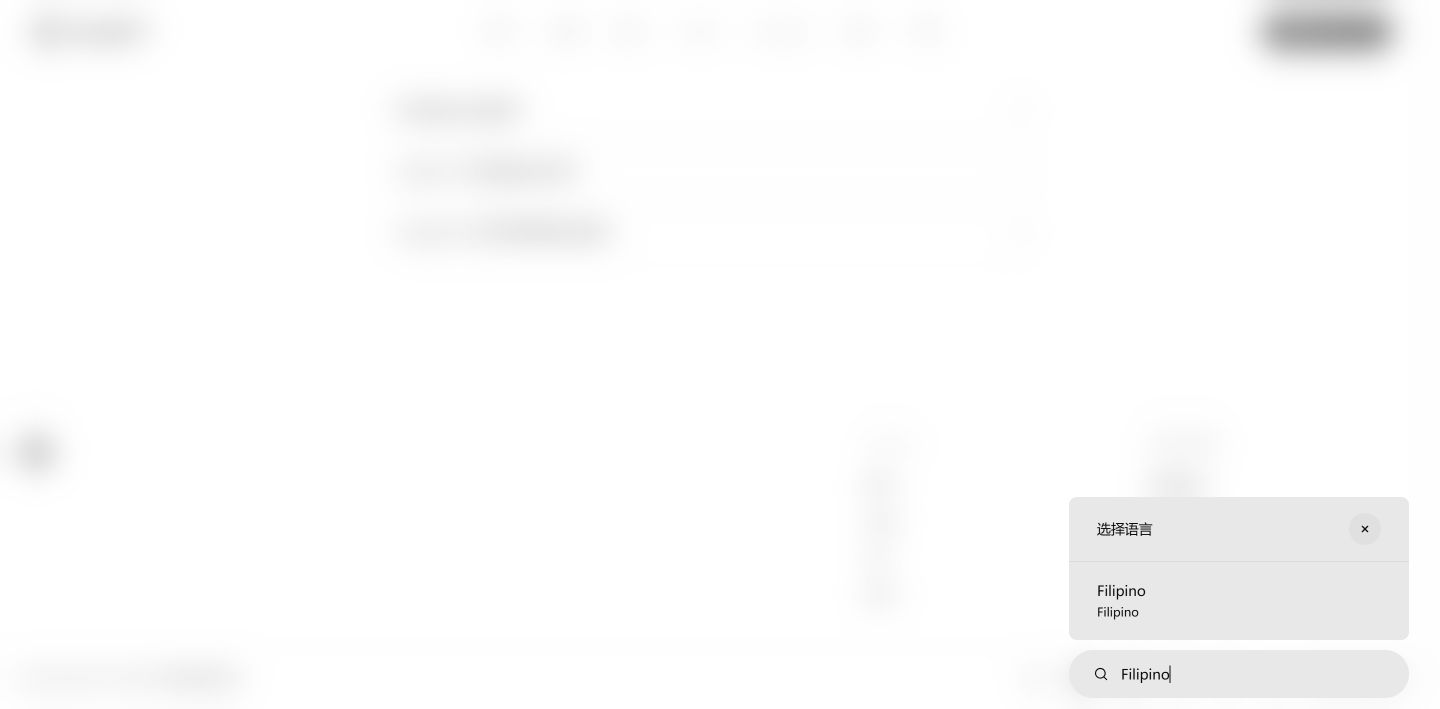
Official ChatGPT pricing page language selector filtered to Filipino02Select this result
Search Filipino in the bottom-right selectorThe selector is labeled Language; the current result is Filipino.
Official Philippine ChatGPT pricing page showing the Pro price03Confirm Pro price
Verify Pro is ₱6,490 per monthThis screenshot is the official localized web page captured at the verification time above.
Manual route

ChatGPT pricing → bottom-right language/country → search Filipino → confirm the Pro amount.

Open the current low-price page Start from the generic pricing page
CHECK THESE BEFORE PAYING
  • If you already subscribe in another currency, cancel and wait for the current billing period to end before changing currency.
  • The checkout total still shows ₱6,490, or you stop and recalculate.
  • Your card, identity, residence, and billing details are real and accepted by the provider.
  • Keep extra balance for tax, FX spread, verification holds, and card fees.
Changing this selector opens a localized pricing page. It does not guarantee billing eligibility or bypass account, residence, payment, or tax checks.
Read OpenAI's official currency rules
NEED A VIRTUAL CARD?

Next: apply, fund, and use Bybit Card.

The beginner guide below covers residence eligibility, buying USDT, matching the transfer network, applying for the virtual card, and paying the merchant.

Jump to the card application guide
LOW-PRICE ROUTES FIRST

Prices you can consider before applying for any card.

Start with a regional storefront you genuinely qualify for or Claude's official annual plan. Each route shows the converted cost, the saving, and where to pay.

Available routes updated
Aug 15, 2026, 12:00 PM
01Lower regional price
ChatGPT Pro 20x

ChatGPT Pro 20x: Philippines is the current lowest reference

₱9,990.00 currently converts to about $162.47, around $37.53 below the $200.00 US benchmark. This card changes automatically when prices or exchange rates change.

Normal cost$200.00Effective cost$162.47Saving18.8%
RoutePhilippines regional App Store price
You must genuinely qualify for the region and payment route. App Store purchases cannot be stacked with Bybit's official-merchant subscription reward.
02Lower regional price
Claude Pro

Save about $1.16 on Claude Pro in Japan

If you already use Japan App Store billing, the ¥3,000 monthly price converts to about $18.84 instead of $20.

Normal cost$20.00Effective cost$18.84Saving5.8%
RouteJapan App Store regional price
The saving is too small to justify changing regions by itself, and App Store payment cannot use Bybit's subscription rebate.
03No-card option
Claude Pro

Save $40 a year without applying for a card

Choose Claude's $200 annual plan to pay the equivalent of $16.67 per month instead of twelve $20 payments.

Normal cost$240.00Effective cost$200.00Saving16.7%
RouteClaude official annual billing
The full $200 is charged up front. A Tier 2 monthly card cap cannot make the annual payment 100% refundable.

Effective costs are estimates at the checked exchange rate. Eligibility, tax, card acceptance, foreign-exchange fees, and campaign limits can change the final amount.

NEXT · USE BYBIT CARD WHEN IT SAVES MORE

Apply with the invite code first. Then use the card for eligible memberships.

This route is for users who genuinely live in a supported region. The invite link or code must be attached to the first card application before you submit it.

DO THIS BEFORE SUBMITTING

Make sure the card invite code is present.

Open the application from our dedicated link. At “Confirm Your Information,” check that the card referral code is filled in. Bybit says it cannot be added or changed after submission.

CARD INVITE CODE
ZRN097P
STEP 1 · OPEN THE LINKStart from the dedicated card invite link
STEP 2 · VERIFY IDENTITYSign in and complete real identity and address checks
STEP 3 · CHECK THE CODEVerify the card code before pressing Confirm
STEP 4 · GET THE VIRTUAL CARDAfter approval, view the card in Card Dashboard
New-card reward: after approval, complete at least 100 USDT of eligible net spending within 30 days to potentially receive 10 USDT. Fees and excluded transactions do not count toward the threshold.
HOW TO USE IT FOR AN AI MEMBERSHIP

Fund the card, pay on the merchant website, then verify the transaction.

Bybit Card spends from your Funding Account. Fiat is used first; if it is insufficient, your selected payment crypto may be converted according to your payment priority and fees.

1 · PREPARE BALANCEKeep enough balance in Funding Account2 · SET PAYMENT ASSETChoose the asset and payment priority3 · PAY THE MERCHANTEnter virtual-card details on Claude's website4 · AUTHENTICATEApprove in Bybit App, then return to checkout
Use Claude's website, not App Store. The published offer names Claude Pro, not Claude Max. Your total Tier 2 reward is still limited to $50 per month.
Check current cashback eligibility
SUBATLAS HUMAN HELP

Used our invite link? We can help you check the process.

Contact us to check whether the code appeared, where to find the virtual card, which Claude checkout to use, and where to review transaction or pending-point status.

SubAtlas support is independent guidance, not Bybit customer service. We cannot approve cards, alter referral codes, or guarantee rewards.
Contact human support
Updated Aug 15, 2026, 10:35 AM
BEGINNER ROUTE · OFFICIAL SCREENSHOTS

From region settings to paying with a virtual card.

A complete walkthrough for first-time users: check eligibility, set the correct store region, buy USDT where available, transfer it safely, apply for the card, and pay the merchant.

Real identity and residence only
STEP ZERO · DO NOT SKIP

Where do you actually live?

Bybit eligibility follows your real residence and KYC documents, not your language, nationality, VPN location, or a generated address.

AAPPLE ACCOUNT · ONLY WHEN GENUINELY ELIGIBLE

Change the store region the official way.

Use this only after you have genuinely moved or otherwise meet Apple's requirements for the new region. A cheaper price alone is not eligibility.
  1. Clear the blockersSpend the remaining Apple Account balance, cancel blocking subscriptions, wait for them to end, and leave Family Sharing if required.
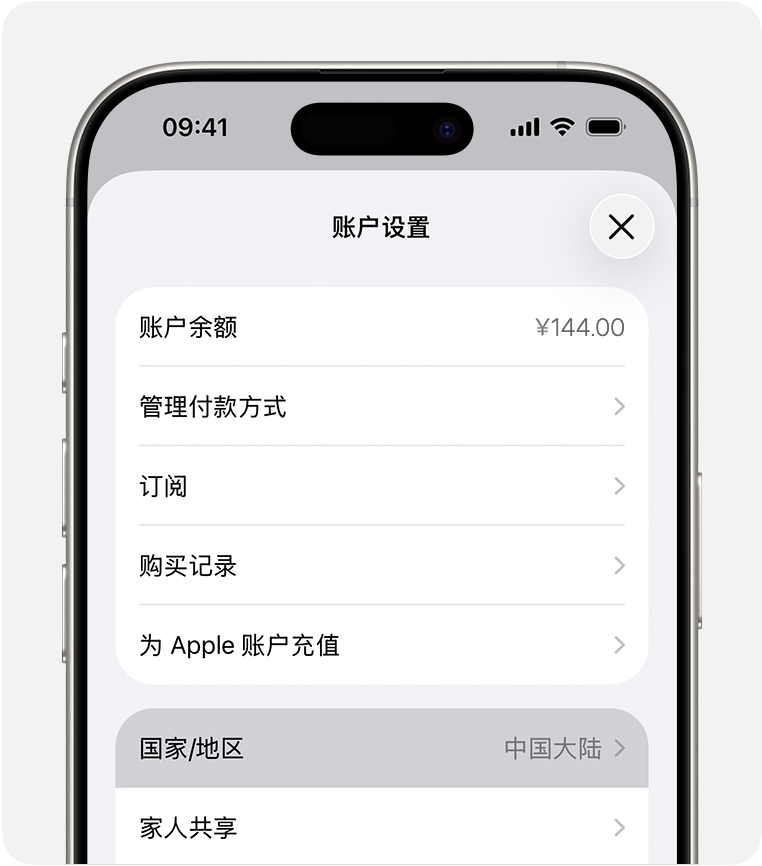
  2. Open Country/RegionSettings → your name → Media & Purchases → View Account → Country/Region.
  3. Choose the real new regionReview the terms and confirm the country or region where you actually qualify.
  4. Add valid billing detailsUse a valid payment method and billing address for that region. Do not fabricate either one.
If you cannot provide the new region's valid payment method and billing details, do not switch just for a lower price.
Open Apple's official guide
Official Apple screenshot showing Country/Region in Account SettingsTap here
Official screenshotApple Account Settings → Country/Region
BBUY U · TRANSFER TO BYBIT

Buy USDT, then move it with the same coin, chain, and address.

This route is only for users who are legally allowed to use both platforms in their registered region. OKX calls this P2P; availability and fiat currency follow the verified account region.
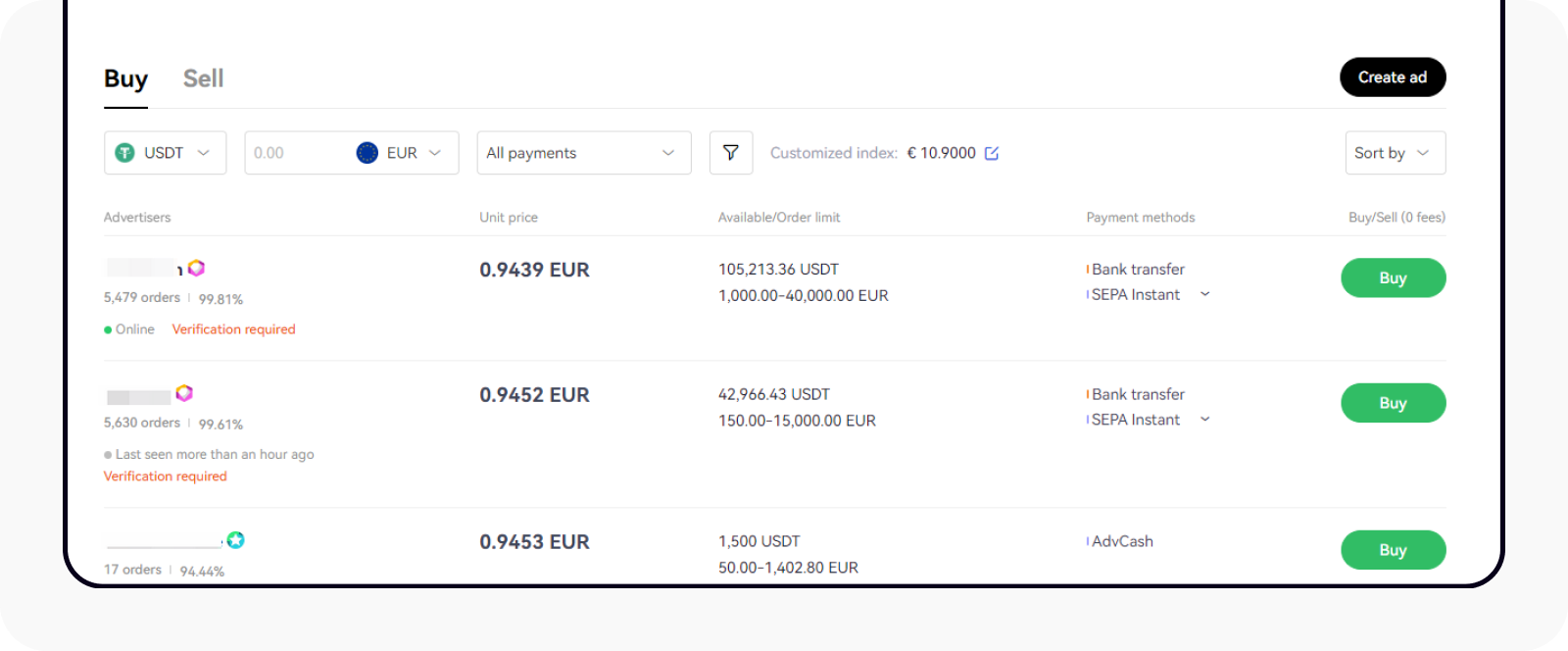
1
Official OKX screenshot of the P2P USDT buy listBuy USDT
Buy USDT on OKX P2PComplete KYC, use a same-name payment account, choose Buy and USDT, then pay only through the order instructions.
Open this step's official guide
2
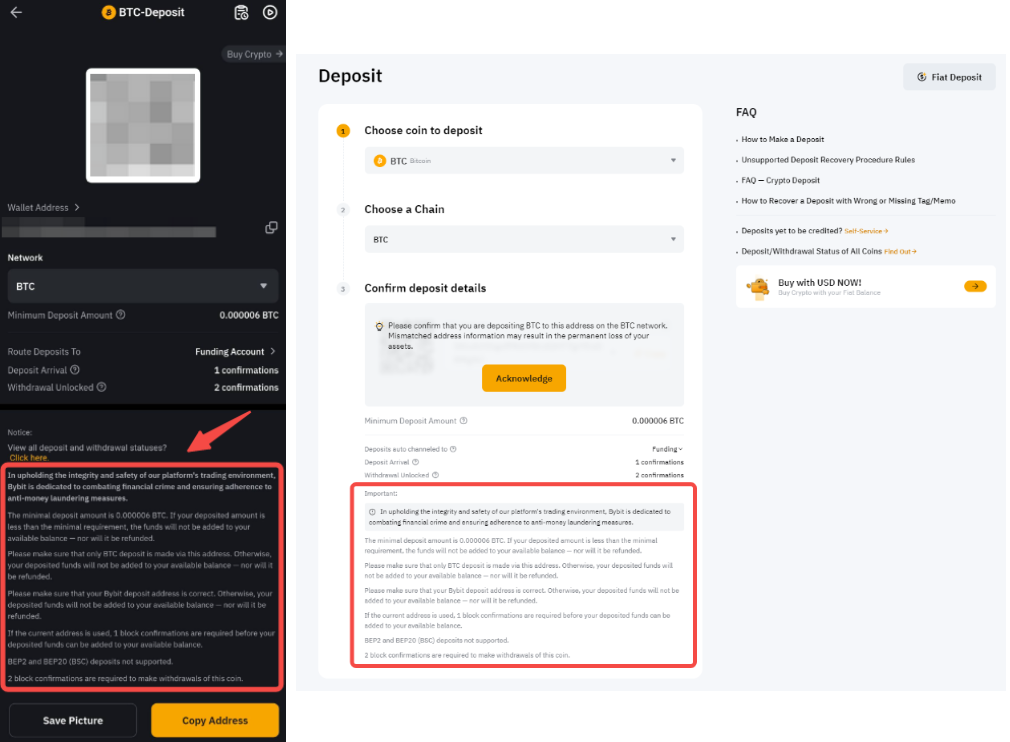
Official Bybit screenshot of the deposit address and chain pageCopy address + chain
Create a Bybit USDT depositAssets → Deposit → USDT. Choose a supported chain, then copy the address and any required memo/tag.
Open this step's official guide
3
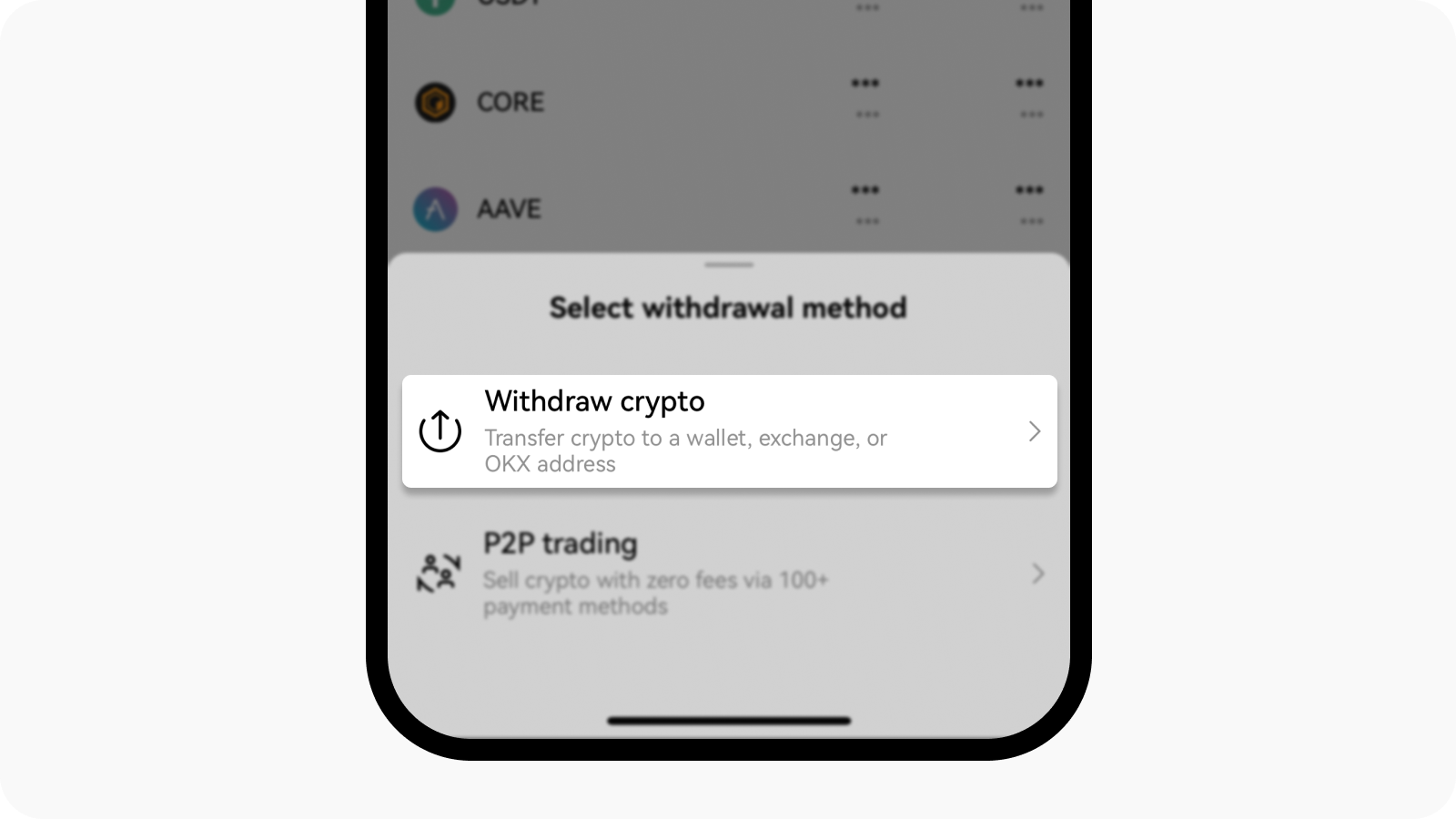
Official OKX screenshot showing Withdraw cryptoWithdraw crypto
Withdraw on-chain from OKXAssets → Withdraw → Withdraw crypto → Exchanges or wallets. Paste the Bybit address and choose the exact same chain.
Open this step's official guide
Coin and chain must match

USDT on the sending side must go to a Bybit USDT address on the same supported network. A mismatch can permanently lose funds.

Send a small test first

Check the minimum deposit and withdrawal fees, send a small amount, and wait until Bybit credits it before sending the rest.

P2P funds may be locked

OKX can apply T+N protection after a P2P purchase. If the order shows a lock, wait until the displayed unlock time; do not try to bypass it.

Use only your same-name account

The payment account name must match your verified OKX identity. Never pay outside the order or accept a third-party payment request.

OPTIONAL EXCHANGE ACCOUNT

Need Binance? Use the dedicated account invitation.

This is an optional funding-platform entry for users whose real region is supported. It is separate from the Bybit Card invitation.

BINANCE INVITE CODE574758729
Open Binance registration Use only the official Binance domain, your real identity, and a region where the service is available.
CBYBIT CARD · APPLICATION TO PAYMENT

Apply for the virtual card, then pay from Funding Account.

The card application checks residence, identity, address, and sometimes income or source-of-funds information. Approval is not guaranteed.
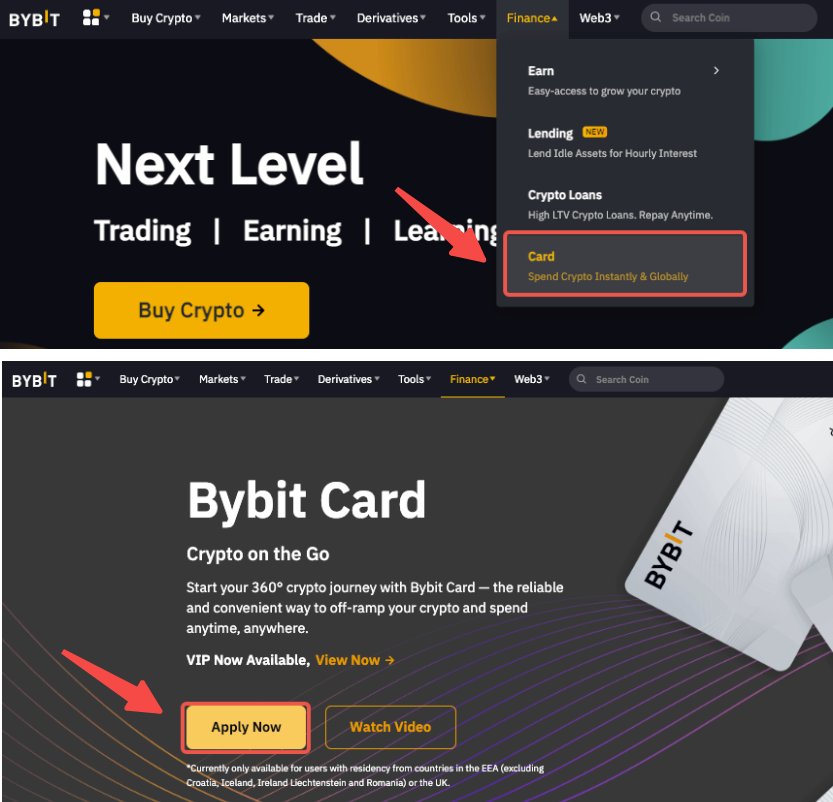
1
Official Bybit screenshot showing Finance then Card and Apply Now
Open Finance → CardStart from the dedicated card invitation link, then open Card and tap Apply Now.
Apply through the dedicated Bybit Card link
2
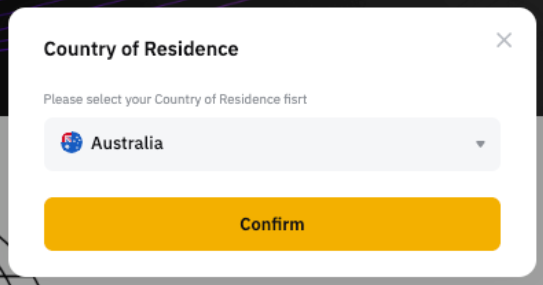
Official Bybit screenshot showing Country of Residence
Select real residenceChoose the country you actually live in. If it is unavailable, stop and join the waitlist.
Open this step's official guide
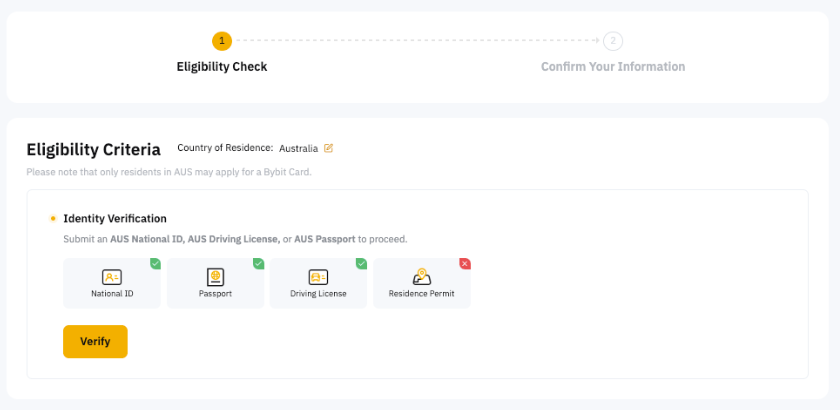
3
Official Bybit screenshot showing identity eligibility check
Complete KYC and addressSubmit your own supported identity document and real residential address.
Open this step's official guide
CHECK BEFORE SUBMITTING

Make sure the card invitation code is attached.

Open the application from the dedicated link and check the code on Confirm Your Information. Bybit says it cannot be added or changed after submission.

Apply through the dedicated Bybit Card link · ZRN097P
4Submit and wait for review

A virtual-card review can take a few minutes and, in some cases, up to seven working days.

5Prepare Funding Account

Keep enough supported fiat or crypto in Funding Account and set the card's crypto payment priority.

6Pay on the merchant website

Use the virtual card on the eligible merchant's official checkout, then complete 3DS, OTP, or app approval if prompted.

STUCK? START HERE

Open the exact page you need, without searching around.

Choose the problem you have now. Internal links jump to the matching step; external links open the official platform page in a new tab.

01

Not sure whether you are eligible

Return to the residence check before opening an exchange or card application.

Check residence first
04

Ready to pay for the membership

Open the official pricing page, confirm the exact plan, and pay only through an eligible official checkout.

Screenshots come from the linked official help pages and may change after an app or website update. Follow the live screen and official rules when they differ.

Multi-country price board

One plan. Many country prices.

Updating rates…
Updated Aug 15, 2026, 12:02 AM
CountryLocal priceUSD estimateVs US
01🇵🇭PhilippinesPHP · last verified
₱9,990.00$162.47−18.8%
02🇨🇦CanadaCAD · last verified
CA$249.00$179.49−10.3%
03🇯🇵JapanJPY · last verified
¥30,000$188.40−5.8%
04🇧🇷BrazilBRL · last verified
R$999.90$192.87−3.6%
05🇺🇸United StatesUSD · last verified
$200.00$200.00Baseline
06🇮🇳IndiaINR · last verified
₹19,900.00$208.31+4.2%
07🇦🇺AustraliaAUD · last verified
A$300.00$212.42+6.2%
08🇹🇼TaiwanTWD · last verified
NT$6,990.00$218.63+9.3%
09🇸🇬SingaporeSGD · last verified
SGD 299.98$234.55+17.3%
10🇩🇪GermanyEUR · last verified
€229.00$264.86+32.4%
11🇬🇧United KingdomGBP · last verified
£200.00$270.70+35.4%

Storefront prices are dated references, not a promise that you qualify to buy in that country. Final tax and checkout rules are controlled by the provider.

Recalculate it

Your receipt, not our headline.

Pick a country and change any input. Exchange rates refresh automatically; subscription prices are checked on a schedule.

THE FORMULAlocal price ÷ FX rate − eligible rebate
Estimated net cost$162.47
You keep $37.53Effective saving 18.8%
Before we call it a deal

Cheap is only real when the route works.

PRICE

Match the exact plan

Pro 5x and Pro 20x are different products. Plan identity comes before currency.

TIME

Date every number

Prices, rates, and promotions carry separate checked times.

CAP

Subtract the cap

“100% cashback” may still stop at $50. We calculate the money, not the slogan.

RULES

Keep eligibility visible

Country, merchant, spending, and card requirements stay beside the deal.

BILLING & TAX SAFETY

Check your real billing details.

We do not generate fake or “tax-free” addresses. Use the country and postal code that match your real residence and payment method.

Tax and eligibility are finalized at checkout. A valid format does not prove residence or tax status.
Enter a postal code to check its format.
US SALES-TAX REFERENCE · REAL BILLING ADDRESS ONLY

States without a statewide general sales tax.

For users whose real billing location is in one of these states. A provider may still apply product-specific, local, or other taxes at checkout.

DE

Delaware

No state or local sales tax

Delaware does not impose state or local sales tax, but it taxes many sellers through gross receipts tax.

Official source
OR

Oregon

No statewide general sales tax

Oregon has no general sales, use, or transaction tax. Other narrow taxes can still apply.

Official source
NH

New Hampshire

No statewide general sales tax

New Hampshire has no general sales tax on goods. Other category-specific taxes still exist.

Official source
MT

Montana

No statewide general sales tax

Montana has no general sales tax, but selective taxes and some resort-area taxes exist.

Official source
AK

Alaska

No statewide tax · check locality

Alaska has no state sales tax, but many cities and boroughs levy local sales tax.

Official source
This is not a list of addresses to copy. Use only your real billing address. The merchant decides the final taxable location and checkout amount.

Source desk

Rates By Exchange Rate API
SubAtlas

Verified subscription deals, without fuzzy math.

MethodCountry price gapReport a price
Affiliate disclosure: we may earn a commission from qualifying card referrals. This does not change the price you pay. Not financial or tax advice.